
Start free — track 100 items, foreverno credit card needed
Scanning a barcode with a phone
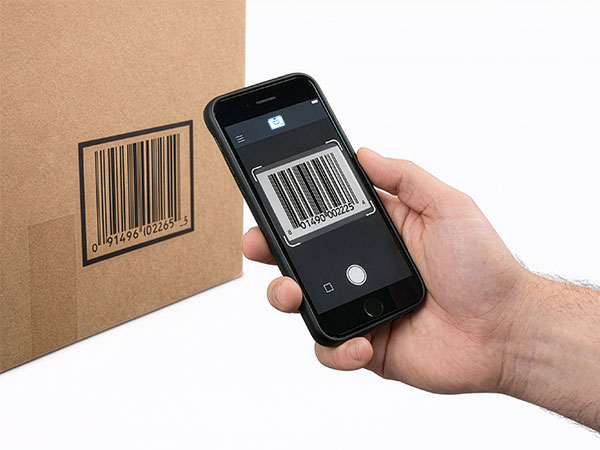
Scan with your phone

Count, move, and find stock with the camera already in your pocket. Works offline, syncs later.

Try the live demo →
Organized stock on shelves
Switching from Sortly?

Bring folders, photos, and history over in an afternoon — with pricing that stays predictable at renewal.

See pricing →
Folder-style inventory list
Free spreadsheet templates

Excel, Google Sheets, and printable count sheets — ready to download, no signup needed.

Get the templates →
Home › Features › Tool checkout

A tool checkout system for crews, vans, and job sites

A tool checkout system that tracks every tool from the crib to the job site: scan to assign a tool to a crew, van, or job, scan it back in when it returns, and find who has the missing grinder in seconds instead of walking the yard. It replaces the paper sign-out sheet the crew stopped filling in months ago.

Start freeSee pricing

Free forever for 100 items · no credit card · tool checkout on the Starter plan

stockzip.app
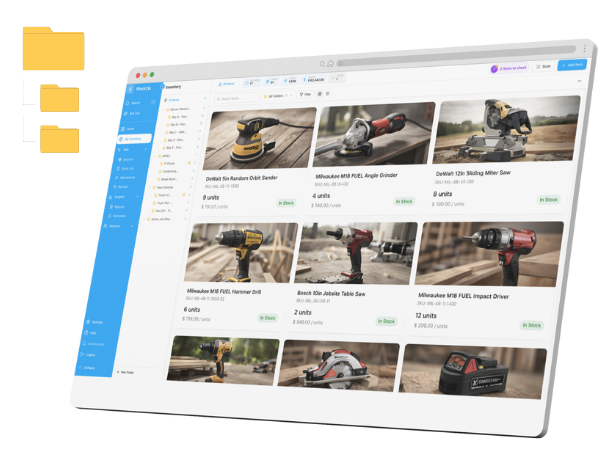
StockZip tool checkout screen tracking power tools assigned to crews and job sites

Every tool in the crib is scannable, so a checkout is one tap and the who-has-what question has an answer instead of an argument.

Three steps, no setup project

How it works

01 · Label the tool crib

Apply a barcode or QR label to every tool worth tracking. Tools without a maker barcode get one you print from StockZip, so the whole crib is scannable.

02 · Check out to a crew or van

Scan each tool at the door and assign it to the person, crew, van, or job site taking it, with an optional return date. Bulk check-out lets you build a whole job kit in one session.

03 · Scan tools back in

When tools return, scan them to close the checkout and keep the tool history current. Overdue tools stay visible until they are scanned back in.

Everything you need in one place

A tool checkout system in your pocket

The phone is the scanner — no proprietary hardware to buy. Scan a tool, pick the assignee, and the checkout is logged, so daily crew use never turns into paperwork.

Van and job-site stocking

Assign tools to a van or a job, not just a person, so you can see the loadout on each truck and know which site a saw walked off to.

Who has the missing tool

A real-time view shows every active checkout and its assignee, so the missing-tool hunt starts with a name instead of a walk around the yard.

Due dates and overdue tools

Set a return date at checkout and review overdue tools in one view, so borrowed gear comes back before the next job needs it.

Bulk check-out for job kits

Assign multiple tools to one crew or job at once — scan each or select from a list — and check them back in individually or as a batch.

Works offline at the yard

Look up tools, run scan sessions, and queue supported checkout updates when signal drops in a metal shop or basement; changes sync once the device reconnects.

Frequently asked questions

What is a tool checkout system?
A tool checkout system tracks who has which tools or equipment. A worker scans a barcode to check a tool out under their name, crew, van, or job, and scans it again on return. StockZip logs every transaction with who, what, when, and where — replacing paper sign-out sheets with digital accountability.
How does the tool checkout system work?
Print barcode or QR labels for your tools. When someone takes a tool, they scan it with their phone and choose the assignee, and StockZip records the checkout with a timestamp. Set a due date if needed, and scan the tool to check it back in when it returns. The full history is searchable.
Can I check tools out to a van or a job, not just a person?
Yes. Assign tools to supported assignee types such as people, jobs, or locations, then keep the checkout history tied to that assignment — useful for van inventory and job-site loadouts.
Does the tool checkout system work offline at the job site?
StockZip supports offline item lookup, scan sessions, and queued checkout updates when signal drops. Supported changes sync after the device reconnects, so a dead spot at the yard does not stop a checkout.
Can I check out a whole kit of tools at once?
Yes. Use bulk check-out to assign multiple tools to one person or job at once — scan each item or select from a list. All items get the same assignee and due date, and you can check them back in individually or as a batch.
Which plan includes the tool checkout system?
The tool checkout workflow (check-in / check-out) is on the Starter plan ($16.99/month, or $14.99/month billed annually) and up — it is not part of the Free plan. Free covers inventory tracking, scanning, and low-stock alerts; Starter adds tool checkout for your whole crew.

Keep exploring

All features →

Set up your inventory in an afternoon

Free for 100 items, no credit card, and your signup price is your renewal price.

Start freeSee pricing
Free for 100 items
No credit card
Start free