
Start free — track 100 items, foreverno credit card needed
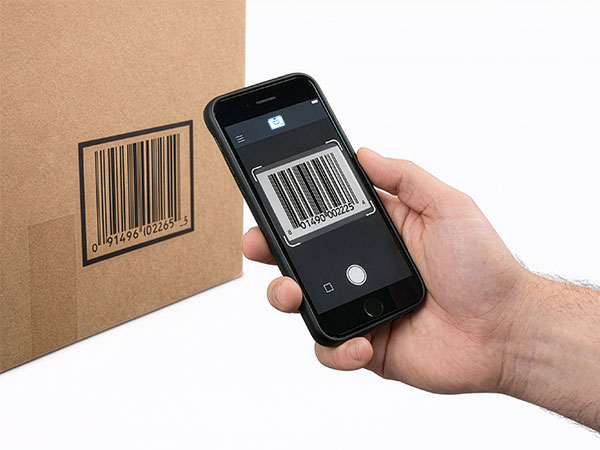
Scanning a barcode with a phone
Scan with your phone

Count, move, and find stock with the camera already in your pocket. Works offline, syncs later.

Try the live demo →
Organized stock on shelves
Switching from Sortly?

Bring folders, photos, and history over in an afternoon — with pricing that stays predictable at renewal.

See pricing →
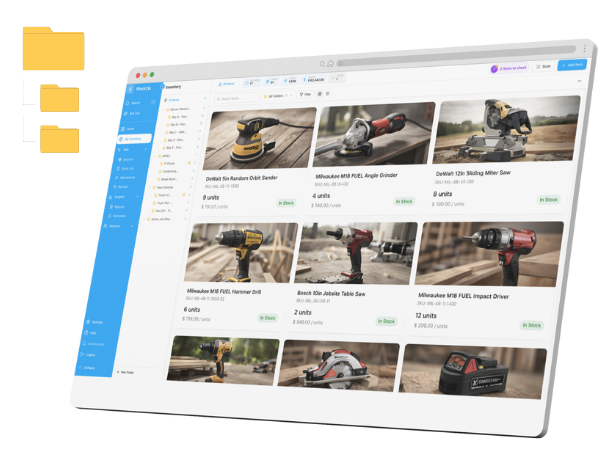
Folder-style inventory list
Free spreadsheet templates

Excel, Google Sheets, and printable count sheets — ready to download, no signup needed.

Get the templates →
Home › Demo

See StockZip in action — inventory management system demo, no sales call

Watch the two-minute video, walk through the core workflows, then demo the real product with your own items on the free plan. Evaluate at your pace, not a sales rep’s.

Demo it live — start freePrefer a guided demo?

Free for 100 items · 14-day Pro trial · no credit card

Product demo

Watch the workflow in 2 minutes

See import, barcode scanning, check-in/check-out, and mobile updates in one simple flow.

The daily work

The four workflows that do the daily work

This is what your team actually touches fifty times a day — the part worth demoing hardest.

01 · Scan to find anything

Point the camera at a barcode or QR label and the item opens instantly — photo, quantity, location, and history. No searching, no typing.

02 · Check in, check out

One tap to check stock out to a person, van, or job — and back in when it returns. Custody is always on the record.

03 · Organize by location

Warehouse → shelf → bin → van as a folder tree. Move stock between locations by scanning, and see totals per location.

04 · Let the alerts watch stock

Set reorder points and StockZip flags what is running low with reorder suggestions — before the bin is empty.

The 30-minute self-demo that beats any sales call

  1. 1

    Sign up free and import 20–50 real items from your spreadsheet (CSV/Excel).

  2. 2

    Print QR labels for a shelf of items — or use the barcodes already on your products.

  3. 3

    Do one real cycle: scan an item, check it out to a person or job, check it back in.

  4. 4

    Open the item history and see the audit trail your current system does not have.

If that loop is faster than what you do today, the evaluation is over.

Demo questions

Do I need to book a call to get a StockZip demo?
No. The demo is self-serve: watch the product video on this page, walk through the core workflows below, then sign up free and demo the real product with your own items — no sales call, no credit card, no time pressure. Every new account includes a 14-day Pro trial so you can test everything, including the order workflow and Counter POS. If you do want a guided walkthrough for a bigger rollout, book one via the Contact Sales page.
What is the fastest way to evaluate StockZip?
Run a 30-minute pilot with real stock. Import 20–50 of your fastest-moving items from a spreadsheet, print or reuse barcode labels, and do one real cycle: scan an item, check it out, check it back in, and watch the audit trail record everything. That single loop demonstrates the core value better than any demo video — and it is exactly the workflow your team would use daily.
Can I demo StockZip with my own inventory data?
Yes, and you should. CSV/Excel import is available on every plan including Free, so you can load your real item list in minutes and see your actual stock in the app rather than sample data. Your data stays yours: everything exports back to CSV at any time, so a failed evaluation costs you nothing.
Does the free plan work as a permanent demo?
Effectively yes. The Free plan is $0 forever for 100 items and 1 user — enough to run a small operation permanently, not just evaluate. The 14-day Pro trial on top lets you test the paid features (order workflow, Counter POS, lot/serial tracking, API). When the trial ends you fall back to Free automatically; there is no forced payment moment.
What should I look for in an inventory software demo?
Test the workflow your team will do 50 times a day, not the feature list: how many taps to scan an item and change its quantity, whether scanning works offline in your building, how long it takes a new staff member to complete their first check-out, and whether the audit trail shows who did what. Also check the exit: can you export all your data as CSV? If a vendor only demos dashboards and reports, the daily workflow is usually the weak spot.

Keep exploring

The best demo is your own stock in the app

Free for 100 items, full Pro features for 14 days, and everything exports back out if it is not for you.

Start the live demoView pricing
Demo it live
Free for 100 items · no credit card
Start the live demo